Infometry LogoInfometry LogoInfometry LogoInfometry Logo
  • Products
    • Google Connectors Product
      • Google Sheets Connector
      • Google Drive Connector
      • Google BigTable Connector
      • Google Pub/Sub
      • Google Ads Connector
    • Global Connectors
      • HubSpot Connector
      • Adaptive Insights
    • Infofiscus Analytics – Sign-up for Demo
  • Solutions
    • Snowflake Solutions
    • PC to Cloud Migration
    • Data Architecture and Strategy
    • Data Analytics
    • Data Management
    • BI and Visualization
  • Resources
    • Blog
      • Salesforce
      • Analytics Solutions
      • IDMC Connector
      • Data Integration
      • Powercenter
      • Snowflake
      • MuleSoft
      • Matillion
      • Power BI
      • Tableau
      • MDM
      • Java
      • RPA
    • Case Studies
    • Gallery
    • webinar
    • Press Releases
  • Industry
    • Hi-Tech
    • Retail Solutions
    • Finance Solutions
    • Manufacturing and Supply Chain
    • Life Sciences and Pharmaceutical Solutions
    • Solar and Energy
    • Healthcare
  • Company
    • Customers – Partners
    • careers
    • Testimonial
  • Contact
✕

How to Setup Globally Salesforce Email

Blog, Salesforce
email templates salesforce, email to salesforce, email-to-case, enhanced email salesforce, Global email, Organization-Wide Email, salesforce email to case setup, setup
Searching Picklist, Multi-Picklist, and Date Values from Global Search and List View Search in Salesforce
January 21, 2019
How to create a custom button for salesforce or More Records in a Table Form in Salesforce?
January 21, 2019

Setup Salesforce Email

Problem Description :

Salesforce Users/Customers receive email alerts from salesforce with “noreply@salesforce” in them from address.

Challenges to User/Developer :

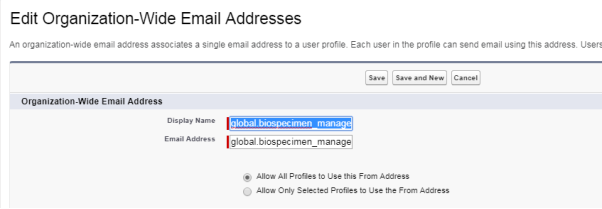
Set the Organization-Wide Email Address.

Solution :

  • Setup and in the quick find box type “Organization-Wide Email Addresses”.
  • Click New.

Advantage :

An email will have the org-wide email address as the from address.

Issues :

None

Conclusion :

Users/Customers receive email alerts from the new Organization-wide address.


Share
0
Rohan omer
Rohan omer

Related posts

January 2, 2026

1win casino and sportsbook in India.14819


Read more
January 2, 2026

1Win Official Site for Sports Betting and Casino – Bonus Up to 100000.10699


Read more
December 31, 2025

Pin Up – Azrbaycann n yax kazinosu Rsmi sayt.7743 (2)


Read more
@2023 Infometry Inc, All Rights Reserved