
How to create a custom button for salesforce or More Records in a Table Form in Salesforce?

How to Setup Globally Salesforce Email
January 21, 2019
Best Way to Indicate Custom Image Indicators Salesforce Lightning
January 21, 2019Problem Description:
Salesforce doesn’t provide out-of-the-box functionality to compare multiple records on a single screen. If a user/customer has to compare records then he/she has to open a record in one browser tab and the other record in another browser tab. However, this is not a feasible solution.
Challenges to User/Developer:
create a custom button for salesforce in the list view which compares the records dynamically.
Solution :
Dynamically Compare Button for 2 or More Records in a Table Form in Salesforce
Approach:
Implement an apex class and a visualforce page that compares and displays the selected records and their respective fields.
Technical Solution :
· Use the following code to build visualforce page.
Visualforce page:
<apex:page standardController="Account" recordSetVar="Account" tabStyle="Account" applyHtmlTag="true" applyBodyTag="true" lightningStyleSheets="[true]" extensions="AccountExtension">
<Style>
 #account {
    border-collapse: collapse;
    border-color: #515A5A;
    border-style:solid;
    border-width:thin;
    table-layout: fixed;
    word-wrap:break-word;
    height:800px;
}
#account td, #account th {
    border: 1px solid #CCD1D1;
    font-size:26;
    Width:250px;
    Height:60px;
    word-wrap:break-word;
}
#account tr:nth-child(even){background-color: #FDFEFE;}{width:150px;}
#account tr:nth-child(odd){background-color: #FDFEFE;}{width:150px;}
#account tr:hover {background-color: #D6EAF8;}
#account tr{
width : 200px;
}
#account th {
    background-color: #2874A6;
    color: white;
    width:320px;
    font-size:26;
    word-wrap:break-word;
    font-weight:normal;
}
</style>
<table id="account" style="font-size: 16px;width:300px;table-layout:fixed" cellpadding="10">
<tr>
    <th>Name:</th>
    <apex:repeat value="{!awList}" var="aw">
    <td>{!aw.account.Name}</td>
    </apex:repeat>
</tr>
<tr>
    <th>Partner Name 2:</th>
    <apex:repeat value="{!awList}" var="aw">
    <td>{!aw.account.Partner_Name_2__c}</td>
    </apex:repeat>
  </tr>
    /*repeat the same for other fields that are required for comparision*/
     <tr>
    <th>Overall KPI Score:</th>
    <apex:repeat value="{!awList}" var="aw">
    <td>
        <apex:outputText value="{0,number,00.00}%">
            <apex:param value="{!aw.account.Overall_KPI_Score__c}" />
        </apex:outputText>
    </td>
    </apex:repeat>
  </tr>
  </table>
    </apex:page>
Extension class:
 public class AccountExtension {
    //public List ac;
    public List selectedAccounts{get; set;}
    public List awList {get; set;}
    public AccountExtension (ApexPages.StandardSetController controller) {
    List ac = (List)controller.getSelected();
   awList=new List();
      selectedAccounts = [Select Sample_and_Data_Processing_Capabilities__c,Partner_Status__c,Partner_Categorization__c,Partner_Name_2__c,Partner_Classification__c,Name,Expired__c,Geographical_coverage__c,Discount_Details__c,Discount_Available__c,Core_Competency__c,Collection_Types__c, Average_Star_Rating__c, Overall_KPI_Score__c,
                            //(Select Id, Score__c From Partner_KPI_Scores__r),
                            (Select Id, Name, Contract_Expiration__c, Contract_With__c, Contract_Type__c From Contracts__r)
                            From Account where id IN :ac];
        for ( Account a : selectedAccounts ) {
            String str='';
            String str1='';
            String serializedJsonContractListStr=JSON.serialize(a.Contracts__r);
            for ( Partner_Contract__c pc : a.Contracts__r ) {
                    str += (pc.Contract_With__c  != null ) ? pc.Contract_With__c + '|' : '';
                    str1 += (pc.Contract_Type__c  != null ) ? pc.Contract_Type__c + '|' : '';
                    //contractTypeString += pc.Contract_Type__c + ';';
            }
            str = ( str != null && str.endsWith('|') ) ? str.removeEnd('|') : str;
            str1 = ( str1 != null && str1.endsWith('|') ) ? str1.removeEnd('|') : str1;
            awList.add(new AccountWrapper(a,str,str1,serializedJsonContractListStr));
        }
    }
    public class AccountWrapper{
        public Account account {get;set;}
        public String contractWith {get;set;}
        public String contractType {get;set;}
        public String serializedJsonContractListStr {get;set;}
        public AccountWrapper(Account a, String contractWith,String contractType, String serializedJsonContractListStr){
            this.account=a;
            this.contractWith=contractWith;
            this.contractType=contractType;
            this.serializedJsonContractListStr=serializedJsonContractListStr;
        }
    }
}
After implementing the code, follow the below steps to create a custom button that displays the visualforce page.
Object Manager -> Required Object -> Buttons, Links, and Actions -> New Button.
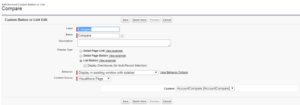
· Add the custom button to the list view:
Object Manager -> Required Object -> Search layouts -> List view -> Edit.
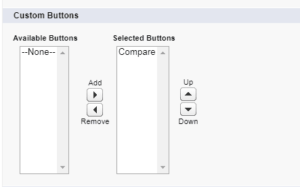
Advantage: Compare multiple records on a single screen.
Issues :
The records which are displayed are dynamically depending on the user selection, however, the fields which are displayed are not and have to add to the code.
Conclusion :
Users can dynamically compare 2 or more records in a table form in Salesforce.
Create Custom Button Salesforce and Links
Every org has a unique set of business needs. If your users frequently need to access other pages in or outside your org, you can add custom buttons and links directly to object and record detail pages. Advanced encryption and full regulatory compliance ensure safety What is Shift Iplex 600
Custom buttons and links help you integrate Salesforce data with external URLs, applications, your company’s intranet, or other back-end office systems.
When your users have all the information they need on hand, they can be even more productive with Salesforce.
