
Excel to CSV using SFTP In IICS

How To Case Comments in Case Object Without The Public Checkbox in Salesforce?
January 21, 2019
CSV Splitting In Informatica cloud platform (IICS)
February 18, 2019Problem Description
Convert Excel to CSV Customers/Users face issues with loading Excel files from SFTP remote server to local machine and convert the excel file to CSV file in mapping on IICS.
Challenges to User/Developer
- In IICS, the above-mentioned problem can be solved through Java Transformation.
- The Excel file needs to be transferred to the local machine (where the security agent is installed).
- The locally available Excel file needs to be converted to a CSV file.
- Move the original Excel file which we got from SFTP remote server to another location.
Solution:
Approach –
Excel to CSV using SFTP In Informatica Intelligent Cloud Services (IICS)
Convert Using Java Transformation, we can achieve the solution for the above-mentioned challenges.
Java transformation is used to add custom integration logic into mappings using a built-in developer-friendly editor or by plugging in custom JAR files.
Technical Solution –
- Develop Java code that performs Excel files transfer from SFTP to Local machine and converts Excel file to CSV file using IDE (ex. Eclipse)
- Create an Executable jar file for the above-developed java code.
- Place the above-created jar file at any directory at the local machine (where the security agent is installed).
- Copy the above directory path including the jar name with extension.
- Create the CLASSPATH Environment variable if not available.
- Paste the above-copied directory to the CLASSPATH Environmental variable.
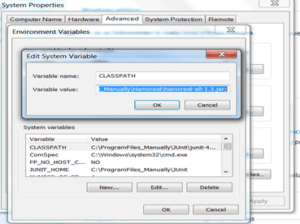
- Restart the secure agent.
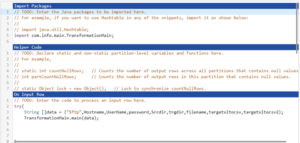
- Create the mapping using source and target with java transformation in between them.

- Edit java transformation to make a call to the specific method of the class available in a jar which is responsible for transferring the file through SFTP to Local machine and converts Excel file to CSV file.
- Compile the above java code, validate the mapping and run.
Advantage –
The file will get a transfer from the SFTP directory to the Local machine directory and convert from an Excel file to a CSV file.
Issues –
None
Conclusion
The excel file will now be transferred to the local machine and will be converted accordingly.
