
Consuming REST Web service and publishing to JMS using Mule 4

Salesforce Integration through Mule 4
December 8, 2020
How to Integrate Snowflake with Mule 4 ?
December 9, 2020Problem Description-
Using Mule 4 Consuming the data from the rest web service and publishing it to Active MQ queue or topic using Mule 4.
Challenges to User/Developer-
using Mule 4 Configuring the data consumed in array format.
Solution
Create a Queue or Topic in the Active MQ.
Approach-
Creating a mule4 flow in order to consume the rest of web service data and to publish it into Active MQ queue/topic.
Technical Solution –
using Mule 4
- Create a Mule4 flow in a mule project and add an HTTP Listener component to it.
- Configure the listener by adding the necessary protocol, host and port and endpoint in the path.
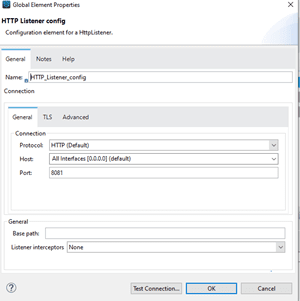
- Add an HTTP request component into the flow and provide a connector configuration.
- To add the connector configuration provide the web service URL as the host and select the protocol.
- As the expectation is to get the data through web service provide the request method as getting and its respective path.
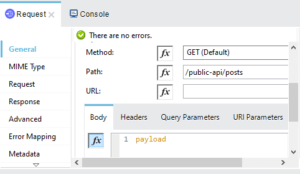
- Set the body as payload.
- Add a JMS publish component into the flow and provide a connector configuration to the component.
- Add the required libraries into the connector.
- Provide the required Username and Password and the necessary Broker URL.
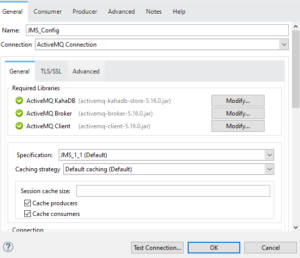
If the expectation is to add the data to a queue provide the queue name into the destination and the destination type as Queue and set the body as payload.
If the expectation is to add the data to a topic provide the topic name into the destination and select the destination type as Topic and set the body as payload.
Save and run the flow.
Once the build and deployment are successful.
Send the request through postman by giving the necessary host, protocol, and endpoint details which are provided in the HTTP listener.
If the response status is 200OK the data will be consumed and added to the Queue/Topic successfully.
Advantages–
The data from any Rest web service can be consumed and added to the JMS queue or topic.
Conclusion–
Using this way the data can be added successfully to the JMS queue/topic.
