
Changing Case Owner Assignment Email Template in Salesforce

Kanban Salesforce for the Objects Which Doesn’t Have Picklist Values
January 21, 2019
Unable To Set a Record Type in Salesforce Object in Salesforce Community
January 21, 2019Problem Description Email Template in Salesforce :
Salesforce customers/users receive the standard/default email every time a case is assigned to him/them. The template cannot be modified as the user will not have access to that email template.
Challenges to User/Developer :
A workaround for this is to create a brand new workflow with a custom email template.
Salesforce Solution :
Chang Case Owner Assignment Email Template in Salesforce
Approach:
Disable the default functionality and create a workflow that imitates the default functionality but with a different email template.
Technical Solution :
To disable the default email functionality,
- Go to setup -> support settings. Disable “Notify Case Owners when Case Ownership Changes”
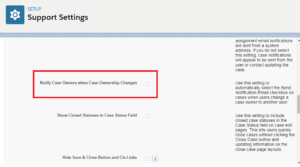
- Now that disabling the default email is done, Go ahead and create a new email template with a new email body and subject.
- After creating the email template, create a workflow rule which sends this email alert when the case owner changes.

Advantage :
The case owner receives customized emails.
Issues :
None.
Conclusion :
There is no straightforward way of changing the email template of the “Change case owner” trigger. This is the easiest and optimal workaround.
Customize the “Case Assignment Notification” email template :
Once a case is assigned to you or to your queue and a notification should be sent out, the related person(s) receive the following email: ———————————– subject: Case transferred to you. ———————————– Case 00001946 has been assigned to you. Please click on the link below to view the record. https://<instance>.salesforce.com/<id> ———————————– That is in general pretty handy, but users complain that they want to see the subject or other properties from the case. However, I learned that it is not possible to change that system-generated template. So the obvious idea is: Being is able to alter this system template. For example, set an existing “Email Template” in the position of the system default template. This should be a very small change in SFDC software that enrolls a great new feature for user customization.
