
Facebook Connector and Extraction of Data through Matillion ETL
Dacia Jogger 7-Sitzer Check Was passt in den Kofferraum
August 31, 2021
Google Ads connector using Matillion
September 8, 2021What is Facebook?
Facebook is an online social media and social networking service, and Facebook Pages helps to do marketing. It provides a platform for the business to enhance the promotion of the product. It allows the creation of marketing pages and opens a way to connect with various business platforms. People can establish business’s presence on Facebook by placing ads by targeting specific audiences so that people can find out about business platforms and connect
To do certain analyses for businesses, people need to pull data from Facebook to their databases. For future business analysis, they sometimes need to combine the data from Facebook with other platforms or they need to do more research on the data. Such a
USECASES
- Find the cost spend for ads on various platform
- Calculating the revenue got from Facebook Ads.
- Analyzing the valuable customer from FB.
- Preparing various visualization or dashboards
Extract data from Facebook by the Facebook connector to a permanent table
Matillion provides a component for extracting data from Facebook by the Facebook connector to the database, one which the user wants to store. This Query component will help the users to extract data from FB. Once the data is available in the database, then users can transform their data by using the transformation components available with Matillion.
Facebook Query component is available with Orchestration Job of Matillion. This Query component establishes a connection with FacebookAPI and allows to retrieve data after verifying the connection.
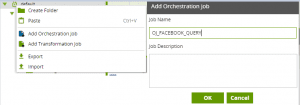
- Create an Orchestration Job by selecting add Orchestration job and give a name in the popup.
- Add the Facebook Query component from the component list to the orchestration job. Users can place the component by using the drag and drop method
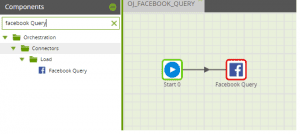
- By clicking on the component user can set the properties
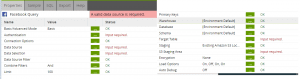
Some of the properties are explained below
Basic/Advanced Mode
Users have two options
- Basic – user can select the Data Source, Data Selection, and Data Source Filter
- Advanced Basic -The user needs to write an SQL-like query, which is translated into Facebook API calls.
Authentication
Users need to creating an Oath entry, acquiring credentials, and authorizing the Facebook Query in advance.
Data Source
Select a data source that needs to extract like Ads, Campaigns, and events, and so on
Data Selection
User need to select the column names which is required
Warehouse
Choose a Snowflake warehouse that will run the load.
Database
Choose a database to create the new table in.
Schema
Select the table schema
Target Table
Provide a new table name.
Load Options
The value of Recreate Target Tablein Load option will decide whether the component recreates its target table before the data load. If you want to use an existing table then we need to keep the value off.
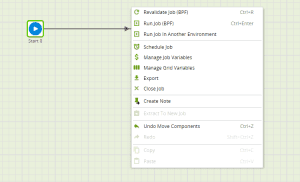
- Revalidate the job once all the properties at set properly. And select the run option if it is valid
The data will be loaded to the specified target table. Users can perform various Matillion transformations on the data.
